Cookies and sessions
Plain explanation
A cookie is a small piece of data that a website asks the browser to store.
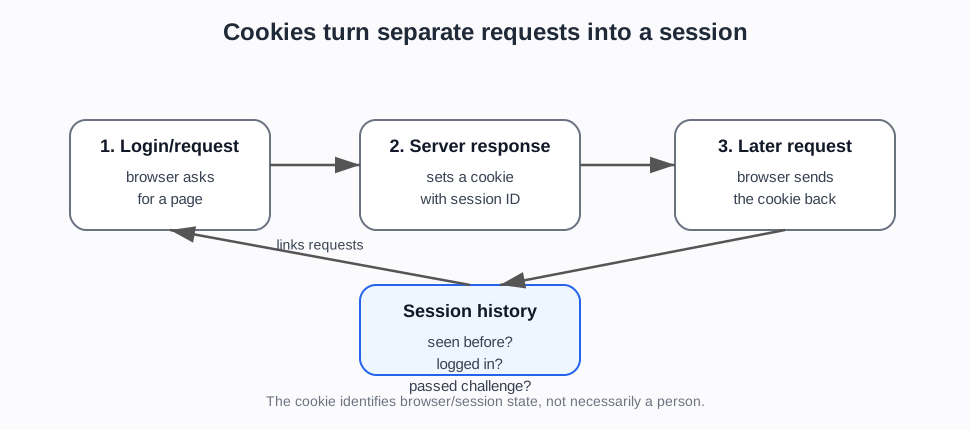
When the browser later requests another page from the same site, it can send that cookie back. This lets the site remember that the browser has been seen before.
HTTP is stateless by default. That means each request is separate unless the site uses something like a cookie to link requests together.
Simple example
- You log in to a website.
- The server checks your username and password.
- If the login is correct, the server sends back a cookie containing a session identifier.
- Your browser stores the cookie.
- On later page requests, your browser sends the cookie back.
- The server uses the session identifier to know this is still the same logged-in browser session.
The cookie normally does not need to contain your password. It can contain an opaque session ID that the server looks up.
Common uses
Cookies are commonly used for:
- login sessions
- shopping baskets
- remembering preferences
- analytics
- tracking behaviour
- fraud and bot detection
- challenge or clearance state, where a browser has already passed some check
Security and privacy points
Cookies are powerful because they link requests together.
That is useful for keeping someone logged in. It is also why stolen session cookies can be dangerous: if an attacker gets a valid session cookie, a website may treat them as the logged-in user.
Cookies can also be used for tracking, especially when they persist for a long time or are used across sites.
What the newer evidence adds
The newer evidence makes cookie/session state a bridge between foundations and automation capability.
MDN gives the neutral mechanics (MDN, Using HTTP cookies). PortSwigger-style authentication sources explain why sessions matter for login security and account abuse (PortSwigger authentication foundations). Browser automation sources show that automated tools can extract, reuse, or preserve cookie state (Playwright cookies). Cloud browser platforms and persistent browser profiles make this more than a theoretical point.
That means this page should prepare the reader for two later ideas:
- lack of cookie history can be suspicious in some flows
- cookie continuity alone does not prove the user is human
Project use
Use this note before discussing:
- session history
- login state
- Cloudflare
__cf_bm - challenge clearance and pre-clearance cookies
- account takeover
- credential stuffing
- browser profiles
- persistent sessions in cloud-browser platforms
- why deleting cookies can make a user look “new”
Sources used on this page
- MDN, Using HTTP cookies — MDN Web Docs (2026). Using HTTP cookies (
SRC-062). - MDN, HTTP authentication — MDN Web Docs (2026). HTTP authentication (
SRC-061). - Wikipedia, HTTP cookie — Wikipedia contributors. HTTP cookie.
- Playwright cookies — Playwright (2026). Authentication / cookie and session-state documentation (
SRC-028). - PortSwigger authentication foundations — PortSwigger Web Security Academy. Authentication, OAuth, and password-login foundation material (
SRC-069-SRC-072).
Foundations navigation
Previous: 01. IP addresses and network origin
Next: 03. HTTP headers, User-Agent, and browser claims