Browser and device fingerprinting
Plain explanation
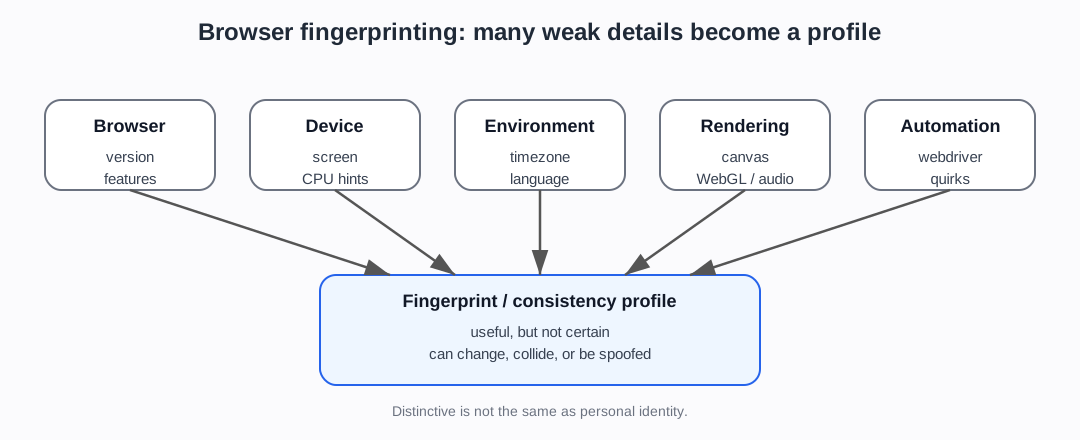
Browser fingerprinting means collecting details about a browser, device, and environment, then combining them into a profile.
Each detail may be ordinary on its own. But the combination can become distinctive.
Examples include:
- browser type and version
- operating system
- screen size
- timezone
- language
- fonts
- plugins
- graphics/WebGL behaviour
- audio/canvas rendering
- CPU or hardware hints
- touch support
- installed features
- JavaScript API behaviour
- automation markers or browser quirks
Why the combination matters
One signal usually does not identify a browser.
For example, many people use Chrome. Many people have the same screen size. Many people are in the same timezone.
But the combination of browser version, screen size, language, timezone, fonts, graphics behaviour, and other details can be much more distinctive.
This is why fingerprinting is sometimes described as “many weak signals becoming one stronger signal”.
Why this matters for bot detection
Bot detection systems can use fingerprinting to check whether a browser looks real and internally consistent.
Suspicious signs can include:
- browser claims Chrome but JavaScript behaviour does not match Chrome
- WebGL or canvas output looks unusual
navigator.webdriveror automation markers are present- plugins/codecs/fonts do not match the claimed platform
- screen, timezone, language, IP location, and headers do not line up
- the same fingerprint appears across many accounts or IPs
- too many “new” fingerprints appear in a short time
Why fingerprinting is not perfect
Fingerprints can change when users update browsers, change settings, use privacy tools, install fonts, switch devices, use private browsing, or change networks.
Bots can also try to spoof, patch, or randomise fingerprint signals.
That means fingerprinting is useful but not certain. A good bot-detection system should treat it as one part of a broader risk judgement.
“Distinctive browser” is not the same as “known person”. Browser fingerprints can be unstable, shared, spoofed, or affected by privacy tools.
What the newer evidence adds
The newer evidence gives this page two jobs.
First, it needs to explain the simple mechanism: many observable browser details can be combined. The older EFF and browser-fingerprinting sources are enough for that (EFF, Cover Your Tracks; Laperdrix et al.).
Second, it needs to prepare the reader for the arms race. Academic papers and surveys cover uniqueness, inconsistencies, privacy, and evasion (Berke et al.; Martinez Llamas et al. 2025). Defender-side sources use fingerprints and browser checks as part of detection. Scraper-side and stealth-tool sources explicitly talk about changing or hiding automation fingerprints (niespodd).
The safest wording is therefore:
Fingerprinting can add useful consistency and recognition evidence, but it does not prove identity, intent, or abuse by itself.
Project use
Use this note before discussing:
- FP-Inspector
- Laperdrix-style browser fingerprinting surveys
- browser fingerprint uniqueness and demographics
- browser fingerprint inconsistencies
- stealth plugins
- anti-detect browsers
- Cloudflare JA3/JA4 and browser signals
- ScrapFly/Bright Data fingerprint management
- privacy and regulatory questions around bot detection
Sources used on this page
- Wikipedia, Device fingerprint — Wikipedia contributors. Device fingerprint.
- EFF, Cover Your Tracks — Electronic Frontier Foundation. Cover Your Tracks.
- MDN, Browser detection using the user agent — MDN Web Docs. Browser detection using the user agent.
- Laperdrix et al. — Laperdrix et al. Browser fingerprinting survey (
SRC-066). - Berke et al. — Berke et al. Browser uniqueness / demographics study (
SRC-067). - Martinez Llamas et al. 2025 — Martinez Llamas et al. (2025). Balancing Security and Privacy: Web Bot Detection, Privacy Challenges, and Regulatory Compliance under the GDPR and AI Act (
SRC-047). - niespodd — niespodd (n.d./ongoing). Avoiding bot detection: How to scrape the web without getting blocked? (
SRC-046).
Foundations navigation
Previous: 03. HTTP headers, User-Agent, and browser claims
Next: 05. Proxies, VPNs, NAT, and shared addresses